
Languages
Multi-language support with translation keys, browser language detection, and automatic URL-based language routing (/en/..., /fr/...). Reference translations in pages using the $t: prefix.
Defining Languages
Set a default language and list supported languages with code, locale, label, and text direction.
languages:
  default: en
  supported:
    - code: en
      locale: en-US
      label: English
      direction: ltr
    - code: fr
      locale: fr-FR
      label: "Français"
      direction: ltr
    - code: ar
      locale: ar-SA
      label: "العربية"
      direction: rtl
Language Entry Properties
Each entry in the supported array describes a language with these properties.
RTL Support
Set direction: rtl for right-to-left languages like Arabic or Hebrew. Sovrium automatically mirrors the page layout, aligns text to the right, and applies the dir="rtl" attribute to the HTML root.
Translation Keys
Define key-value pairs for each language. Keys use dot notation for organization.
languages:
  translations:
    en:
      hero.title: "Welcome to My App"
      hero.description: "Build faster with Sovrium"
      nav.home: "Home"
      nav.about: "About"
    fr:
      hero.title: "Bienvenue sur Mon App"
      hero.description: "Construisez plus vite avec Sovrium"
      nav.home: "Accueil"
      nav.about: "À propos"
Using Translations
Reference translations in any content or prop value with the $t: prefix.
# Reference translations with $t: prefix
pages:
  - name: home
    path: /
    sections:
      - type: section
        children:
          - type: h1
            content: "$t:hero.title"
          - type: paragraph
            content: "$t:hero.description"
$t: Translation Syntax
Use $t:key.path in any page content or prop value to reference a translation. Example: $t:hero.title resolves to "Welcome" in English and "Bienvenue" in French.

English - /en/
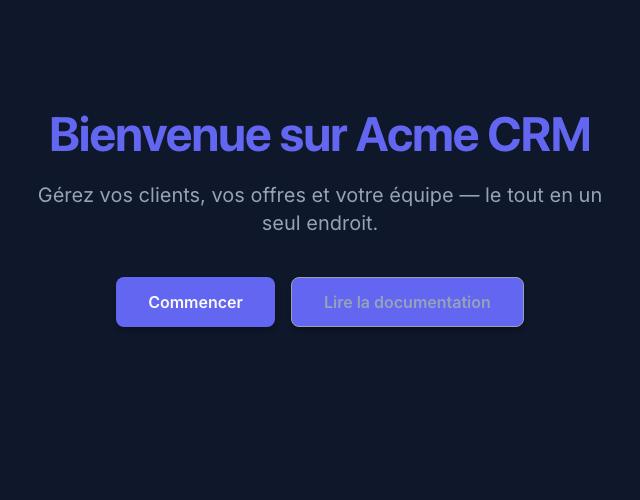
Français - /fr/
Adding a New Language
Follow these steps to add a new language to your application.
Add language entry
Add a new item to the supported array with code, locale, label, and direction.
Add translations
Create a new translations section for the language code with all required keys.
Test the language
Visit /[lang-code]/ in your browser to verify the new language renders correctly.